
Registration families finish in
Publish a season, tryout, clinic or camp. Families answer your questions, sign the waiver and pay in a few clear steps, and your staff review every sign-up before it lands on a team.
Try it: tap the steps in the demo
Offerings
Every way a player joins your club.
An offering is anything families sign up for. Each has its own dates, price, form, waivers and capacity, and can be public, unlisted or invite-only.
Season registration
Players sign up for the season, then you place them on teams.
Tryouts
Register, check in, score and send offers, all from one offering.
Team invites
Invite-only registration for players you have already placed.
Clinics and camps
Short programs with their own dates, capacity and price.
Tournaments
Collect players or teams for an event with its own fee.
How it works
Set it up once. Review, don't chase.
Step 1: Create the offering
Pick the kind, season, dates and capacity.Step 2: Build the form
Add your questions and attach the waivers families must sign.Step 3: Set the price
Base fee, optional add-ons, discounts and promo codes.Step 4: Families register
Each child in a few steps, signed and paid, from the web or the app.Step 5: Review and accept
Accept onto a team, waitlist or decline. Families are told either way.
The details that matter
Waivers that hold up. Prices families understand.
Two things that go wrong on paper and in spreadsheets: which version of the waiver someone signed, and why their total is what it is.
- Every signature records who signed, for which child, and on which waiver version
- Update a waiver any time; past signatures keep the version they agreed to
- Sibling, early-bird and promo discounts each show as their own line
- Families see the total before they pay, with a plan where you offer one
- Version 3Current. Used for new registrations
- Version 2Kept with every signature made on it
- Version 1Kept with every signature made on it
Signature record
Signed by Dana Chen for Maya Chen, on version 3.
- Season fee
- $250.00
- Sibling discountSecond child in the family
- −$25.00
- Early-bird discountRegistered before the date
- −$15.00
- Promo code EARLY10% off
- −$21.00
- Total
- $189.00
Capabilities
What registration handles.
The pieces clubs usually stitch together from a form builder, a payment link and a folder of PDFs.
Custom forms
Ask what you need: text, choices, checkboxes, dates and numbers. Questions can be for the player or for the guardian.Versioned waivers
Waivers are signed online. Edit one and it becomes a new version; every signature keeps the exact version signed.Discounts
Sibling discounts, early-bird pricing and promo codes, applied automatically and shown line by line.Optional add-ons
Offer extras like a uniform kit next to the base fee. Families choose, and the total updates.Capacity and waitlist
Set a limit. When it fills, new sign-ups join the waitlist instead of being turned away.Review, then accept
Staff review each registration and accept it onto a team, waitlist it or decline it, one at a time or in bulk.Invite-only offerings
Keep an offering off the public list. Only families with an invite link can register.Built for families
Guardians register each of their kids and answer for them, with sibling discounts applied automatically.Payment at checkout
Paid offerings take payment through Stripe as part of registering, with a payment plan where the club offers one.
The real screen
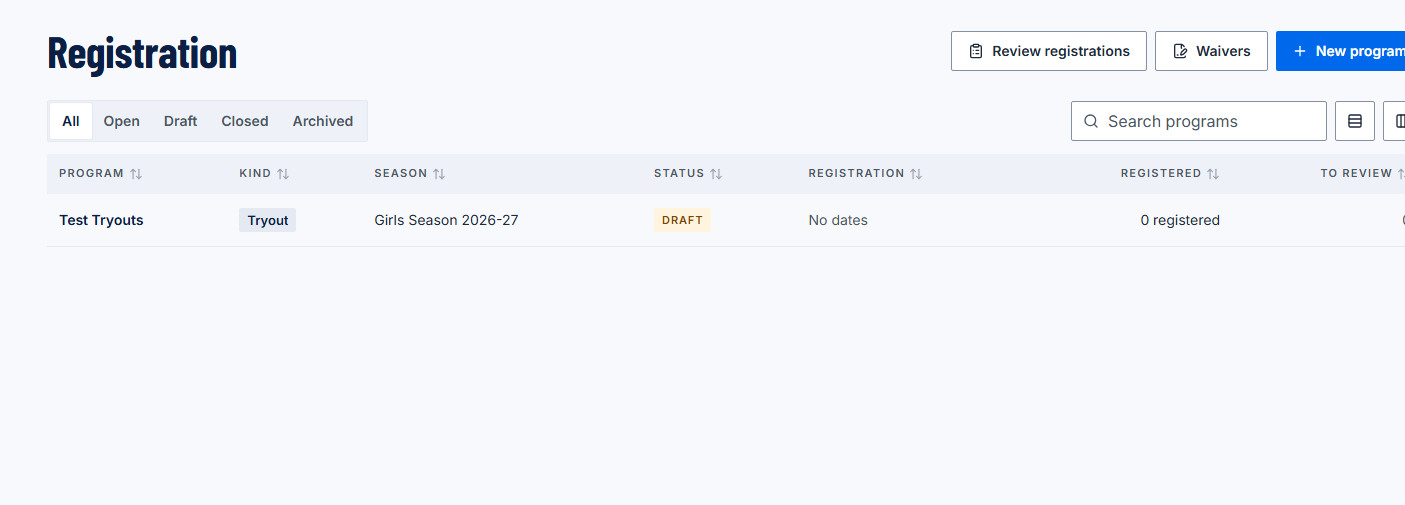
Every offering, one list.
The registration list in the SportAxis web app: each offering with its kind, season and status, how many have registered, and how many are waiting for review.
Who gets what
Less admin, fewer emails.
Directors and admins
- Every offering, form and waiver in one place
- A review queue instead of an inbox
- Capacity and waitlists that manage themselves
Coaches
- Accepted players arrive on your roster
- Guardians linked from day one
- Invite-only registration for players you’ve placed
Parents and players
- Register each of your kids from one account
- Discounts applied for you, line by line
- Sign and pay on your phone
What can registration handle?
Clubs publish registration offerings such as tryouts, clinics, camps and invite-only team registrations. Each can have custom questions, waivers signed online, optional add-ons, discount codes, capacity with a waitlist, and staff review before acceptance.
What happens when we update our waiver?
Editing a waiver creates a new version. New registrations sign the new version, and every earlier signature stays attached to the version that person actually signed.
How do sibling and early-bird discounts work?
You set them on the offering. A sibling discount applies when a family registers more than one child, early-bird pricing applies before the date you choose, and promo codes apply when entered. Families see each discount as its own line before they pay.
What happens when an offering is full?
If the waitlist is on, new registrations join it. Staff can accept someone from the waitlist later, and SportAxis tells you if that would go over capacity.
Can we run invite-only registration for a team?
Yes. Make the offering invite-only and send invites by email. Only invited families can register, which suits team invites after tryouts.
Early access
Open registration without the paperwork.
We're opening SportAxis to clubs in small groups. Join the list and we'll reach out when there's a spot for you. Early-access pricing: join the list.
Want to tell us more about your club? Use the full early-access form.