
Schedules that keep up with the
Practices, games and meetings for every team in one schedule. Build a weekly series in a minute, catch field conflicts before they happen, and let families RSVP and sync it to their own calendar.
How it works
From an empty season to a full calendar.
Four steps, once per season. After that, the schedule mostly takes care of itself.
Step 1: Add your venues
Enter each park, gym or rink once, with its fields or courts.Step 2: Build a series
Pick the team, days, time and field. SportAxis creates every practice through the end of the season.Step 3: Add games and events
Drop in games, tournaments and meetings. Conflicts show up before you save.Step 4: Families follow along
Everyone on the team sees it, RSVPs, gets change alerts and can sync it to their calendar.
Capabilities
What the schedule handles for you.
Built for how clubs actually run: many teams, shared fields, and plans that change on a Tuesday afternoon.
Venues and fields
Save each venue once, with its fields or courts, so every event points to the right place and the right pitch.Weekly series
Tuesday and Thursday practices all season in one step. Times stay correct across daylight saving changes.This, or this and following
Change one practice, or every practice from a date on. Past events stay exactly as they happened.Conflict checks
SportAxis flags when two teams are booked on the same field at the same time, before you save.RSVP for every event
Going, maybe or not going. Parents answer for each of their kids, and coaches see the count at a glance.Change alerts and reminders
When an event moves or is cancelled, the people on that team are notified. RSVP reminders go out before events.Calendar sync
A private feed link for Google Calendar, Apple Calendar and Outlook that updates when the schedule does.Cancel, postpone, restore
Rain-outs happen. Cancel or postpone an event, restore it if plans change, and extend a series when the season runs long.- Coming Soon
Game scores
Scores and per-sport stats on game events are on the roadmap.
RSVP and calendar sync
Know who's coming. Put it where families already look.
Every event has an RSVP. Parents answer for each of their kids from the web or the app, and coaches see the count, who hasn't answered, and who answered for whom.
- Guardians answer for each child; players with an account answer for themselves
- A reminder goes out before the event to anyone who has not answered
- Each person gets a private calendar feed link, so the schedule appears in Google Calendar, Apple Calendar or Outlook
- Change an event and the feed follows, with an alert to the team
- 12Going
- 2Maybe
- 1Not going
- 1No answer
- Maya ChenAnswered by Dana Chen, guardianGoing
- Leo AlvarezAnswered by LeoGoing
- Ava BrooksAnswered by Sam Brooks, guardianMaybe
- Noah PatelAnswered by Priya Patel, guardianNot going
- Zoe KimA reminder goes out before the eventNo answer
Your private feed
Works with
- Google Calendar
- Apple Calendar
- Outlook
Who gets what
One schedule, seen three ways.
Directors and admins
- Every team, venue and field in one view
- Field conflicts caught before families see them
- Series that run the whole season from one setup
Coaches
- Your team's week, with RSVP counts on each event
- Move a practice and the team is told
- Edit from the sideline in the mobile app
Parents and players
- Every child’s events in one place
- RSVP for each kid in one tap
- Sync to the calendar you already use
The real screen
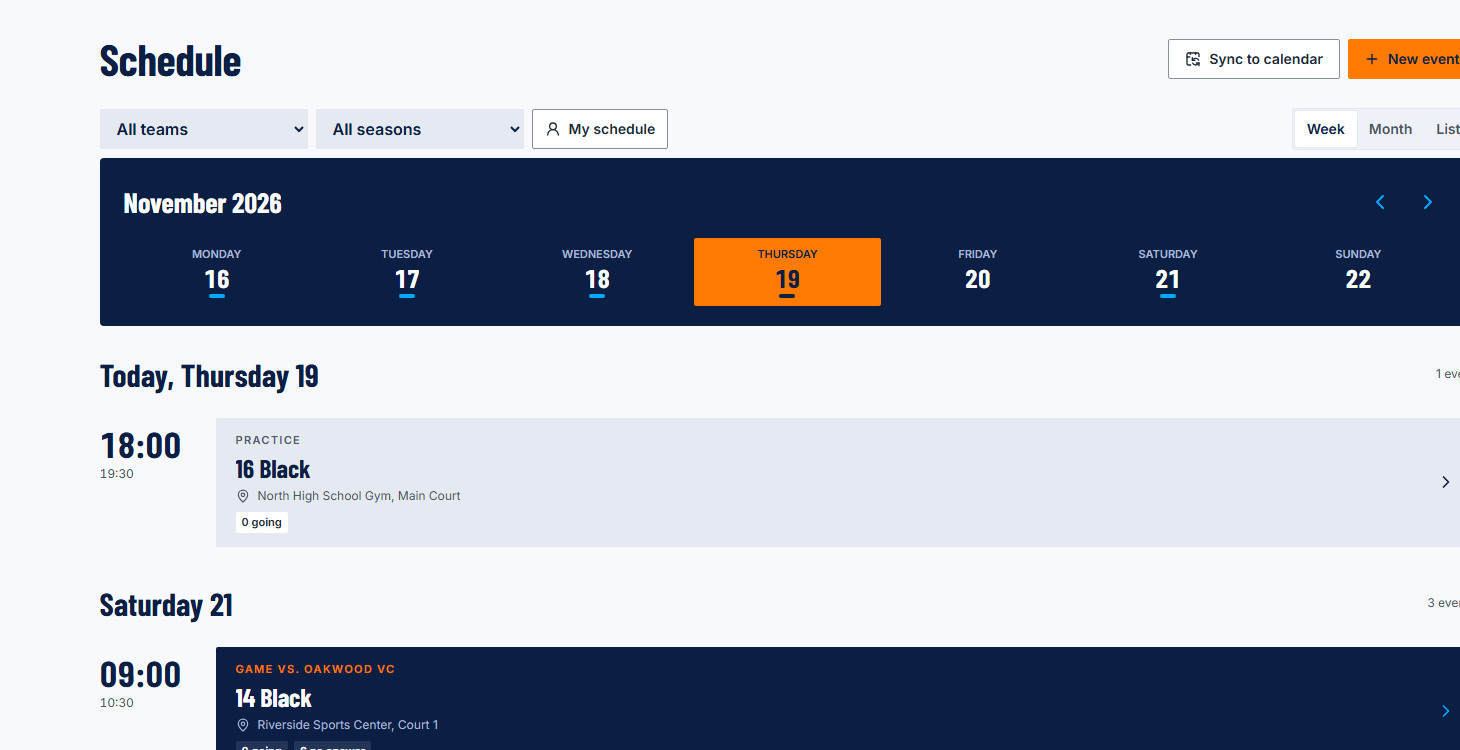
The week, across every team.
This is the schedule in the SportAxis web app today: the week at a glance, every practice and game with its venue and court, RSVP counts on each event, and Sync to calendar one click away.
Does the schedule sync with my calendar?
Yes. Every person gets a private calendar feed link that works with Google Calendar, Apple Calendar and Outlook, so practices and games appear alongside everything else. Changes in SportAxis flow through to the feed, and families are notified when an event changes.
What happens to a weekly series when I change one practice?
You choose. Edit just that event, or that event and every one after it. Earlier events in the series are left alone, and families on the team are told about the change.
Can parents RSVP for their kids?
Yes. A guardian can answer for each of their children, and players with their own account can answer for themselves. Coaches see who answered and how many are going.
Does SportAxis stop double-booking a field?
It checks for conflicts when you create or move an event and shows you any team already booked on that venue or field at that time, so you can pick another slot before anything is saved.
Do recurring events handle daylight saving time?
Yes. Series are stored in the club’s time zone, so a 5:30 PM practice stays at 5:30 PM on both sides of a clock change.
Related
Works with the rest of the season.
Early access
Put this season on one schedule.
We're opening SportAxis to clubs in small groups. Join the list and we'll reach out when there's a spot for you. Early-access pricing: join the list.
Want to tell us more about your club? Use the full early-access form.